





HughJanus
Recognized Creator
-
Joined
-
Last visited
Everything posted by HughJanus
-
There are a few good GTA 5 modding tutorials on youtube. They apply to RDR2 as well. Here are some videos I started with almost two years ago: https://www.youtube.com/watch?v=Oc16GjTfztQ https://www.youtube.com/watch?v=pCIfZh0Lni4
-
 @SAC Here you go. New parameters for below dying state stumbling: DSStumbleChanceBothLegs DSStumbleChanceOneLeg DSRunningThresholdBothLegs DSRunningThresholdOneLeg Tweak them as you want and let us know which values work best, please. PedDamageOverhaul.asi PedDamageOverhaul.ini
- 1271 comments
- 5 reviews
-
Here it is, I dont know what happened. The setting is enabled by default, though. So if the mod doesnt find it in the ini, it is automatically set to 1. PedDamageOverhaul.ini PedDamageOverhaul.asi
- 1271 comments
- 5 reviews
-
@SAC I understand what you mean, but if you play with NPCHealth=75 you will see that this behavior does not happen and stumbling would conflict with the limping and coughing (vanilla reaction). So there IS a certain health threshold over which the NPCs will start standing around. I suppose this is because they are only tasked to go a certain distance and during walking this distance, if their health falls below 5 or 10, they fall to the ground and squirm for a few seconds. If they can walk the distance without their health getting this low, the falling will not trigger and the NPC will stand until its health reaches 0. Thus we need to know the threshold in order to tackle this problem properly. Edit: Just watched your video and I see you are not talking about the bleeding out animation. I introduced a new ini parameter "StumblingBelowDSThreshold" which, if enabled, makes NPCs prone to stumbling (like their legs were hurt) if their health is under the dying thresholds. PedDamageOverhaul.asi PedDamageOverhaul.ini
- 1271 comments
- 5 reviews
-
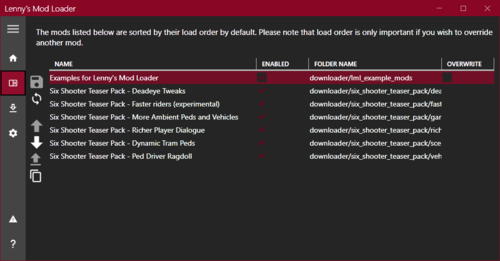 No, the actual mod manager (not the dlls). I also dont like having a separate program to manage mods (I like to do it by hand), but it didnt work for me any other way.
- 785 comments
- 8 reviews
-
@WesternGamer installing the Mod Manager fixed it. I still have no vfs.log, but the Mod Manager created a mods.xml in the lml folder - now my mod is loading.
- 785 comments
- 8 reviews
-
In this version I corrected a bug concerning the status function for npcs (shown on screen). Could you try lower health values and tell me when this stops happening? Then I can bind the stumbling to higher health values so it doesnt conflict with anything else. @ChristianW. You could test it by making yourself invincible (via the ini) and the gaining a high wanted level. Riders will spawn. Could you please enable ShowNPCHealth in the ini while testing - and if it happens, screenshot the values for the rider shooting the machine gun, please. @Alleg3dLee Thanks for the feedback!
- 1271 comments
- 5 reviews
-
@SAC Hm, maybe the health is too high for the games function to work? Could you enable "ShowNPCHealth" in the ini and report back if the NPC loses health when bleeding? If not, try enabling BleedWhenShot and check if it helps. I guess the falling down and squirming only happens when health is low (like 5 or 10) and due to the NPC never getting this low health, it never triggers properly. PedDamageOverhaul.asi PedDamageOverhaul.ini
- 1271 comments
- 5 reviews
-
@WesternGamer Script Hook works as it should. All the asis (except for vfs.asi) are loaded according to its log. What I dont have is the vfs.log (telling me which mods LML is loading) and according to your post it is loaded by dinput.dll (which is not part of Script Hook) - why do you suggest reinstalling Script Hook? I am a bit lost here. Edit: Saw that dinput.dll IS a part of script hook and reinstalled. Unfortunately it didnt change anything. Do I maybe have to use the Mod Manager that comes with the loader? I didnt install that one.
- 785 comments
- 8 reviews
-
-
Some new ini values, some fixes. PedDamageOverhaul.asi PedDamageOverhaul.ini
- 1271 comments
- 5 reviews
-
Seems my vfs.asi is not loaded by script hook (although all other asis are loaded), thus I have no log. What could prevent script hook from loading the file?
- 785 comments
- 8 reviews
-
@SAC I cant do anything about the volume, unfortunately. Concerning the bleeding and standing - could you use the tools at the bottom of the ini and check at which health NPCs are standing and bleeding?
- 1271 comments
- 5 reviews
-
Does anybody know the task id of the "hands up" task? I figured its 532 out of some tests fitfondue did and recorded, but I am not sure.
-
New beta. Please just play with it (ini can be adjusted as you want) and give feedback if the gameplay feels fluid and believeable. PedDamageOverhaul.ini PedDamageOverhaul.asi
- 1271 comments
- 5 reviews
-
@New Denim Could you check your ini to see if its enabled? And if not, provide us a list of other mods and hooks you are using?
- 1271 comments
- 5 reviews
-
@New Denim Entreped is correct, if you have the DyingStatesForMelee and/or MeleeDyingStatesKnockout enabled, those are the culprits (I dont know if the parameters are named exactly like that, but its somewhere close - just search for "melee" in the ini and disable both). Those were requested by a guy making videos - he wanted to knock NPCs "the f*ck out". These functions serve no other purpose^^ As for the wagon pushing - there is nothing we can do, unfortunately. Friendly fire works by setting the relationship between Arthur and the gang to "not gang" - thus he will be pushing others off vehicles.
- 1271 comments
- 5 reviews
-
-
@samawry If you already have the gun lying on the ground equipped, you cant pick it up. You should be able to pick up any weapon you dont have equipped.
- 1271 comments
- 5 reviews
-
@samawry The falling time is set to an impossible value, since the NPCHealth has been lowered (thus falls work as intended and the workaround is not needed). TorsoShotBleedingOverwrite if active, renders the MaximumDyingStateTime useless - we will adjust the description. If you have EuphoriaModInstalled activated, the DyingForcePushX is not applied anymore. I have not played with WERO, so I dont know which errors it might cause. If you happen to test the melee stuff without WERO, I would really appreciate the feedback (if it still happens or not). I will put melee fights to the test again, either way.
- 1271 comments
- 5 reviews
-
@ChristianW. in the testing ini OnlyBleedOnTorsoShot is enabled, I think. Turn it off, if you want NPCs to always bleed.
- 1271 comments
- 5 reviews
-
@LMS Hey LMS, I just wanted to make a little euphoria adjustment and tried using LML. I created an install.xml as shown in the examples, but it is not working. It works perfectly using the "replace" folder, but not using the install.xml. Would you be able to help out? PDO v2.0 Dismemberment Reactions.zip
- 785 comments
- 8 reviews
-
@Entreped Only the mods core drain can be controlled by the ini. The vanilla core drain or any others (of mods) are not touched. New beta. Just did some tweaking and some small fixes. PedDamageOverhaul.ini PedDamageOverhaul.asi
- 1271 comments
- 5 reviews
-
I know that the launcher cannot connect to the rockstar servers, but I cant even play offline. Infinite loading screen is what I get when Im trying to play story mode. Has anyone managed to get the game running?
-
 What does this do exactly? Can it show ped model names for NPCs aimed at?