
Gunter Severloh
Recognized Creator
-
Joined
-
Last visited
-
For those of you whom use my mod Bandit Hideouts, in v1.46 i added a new mode called: Assault mode & Stealth mode In v1.47 i had updated stealth mode alot, v1.48 is being worked on and will be posted on October 26th. Today i want to share with you 3 videos i had recorded, the first was just before i posted v1.46 and the last 2 videos on stealth mode part 1 and part 2 i had posted on my channel yesterday and earlier. These two videos demonstrate and go over the basics of stealth mode, how it works. There is an article on the BH mod page titled: "How stealth mode works - Guide" https://www.nexusmods.com/reddeadredemption2/articles/1026 It goes into great detail on stealth mode. Here are the 3 videos: More videos to come for the mod! Also note, you may notice most especially in the first video that there is some little lag, that is my video card slowly failing. i had to update my OBS Studio settings to fix the lag that was in the video, although in the game itself i dont have any lag or issues, so just pointing that out that soon i will be getting a new GPU. Any questions or problems best to ask on the post tab of the mod page on Nexus website as im there everyday opposed to here. Cheers!
-
v1.47 released! See the changelog here: https://www.nexusmods.com/reddeadredemption2/articles/1029
-
v1.46 released! See the changelog here: Bandit Hideouts v1.46 Changelog
-
Next update is v1.46, it will be released on September the 14th. This video i posted about a week ago on the new Assault feature for hideouts, in the video i go over settings, reinforcements, and some other things related. This is to just show you whats coming in v1.46 and this is only one things of many. Just to note when i recorded the video i had something updating and running in the background so it got a little choppy, not bad just the recording itself isnt smooth. Ingame im getting 60-70fps and i use 51 mods so the game regardless is smooth. Btw im always on the Nexus mod page everyday: https://www.nexusmods.com/reddeadredemption2/mods/2213 So if you have questions, bugs to report, or ideas for new features let me know there. Cheers!
-
UPDATE Bandit Hideouts v1.45 Changelog Hired Guns Added - New Patrol command — send a hired gun out to walk a wide loop (~25m) around a spot you choose, gun in hand, on the lookout, until you tell him to stop. When stopped, he now walks straight back to you and regroups instead of just wandering off wherever he happens to be. - New Hired Gun Presets — 8 ready-made loadouts (Cowhand, Gunslinger, Bounty Hunter, Mountain Man, Skirmisher, Shotgunner, Rifleman, Bow Hunter), each with its own weapons and fighting style. Pick a preset and get an instantly-equipped hired gun with a fitting random look, no need to build one from scratch. - New standalone Hired Gun Presets option on the main hire menu, separate from Custom Hire (which still has its own preset-loadout option too, if you'd rather pick the model yourself). - New commands: Attack Target, Revive All, Cover Me, Spread Out, Regroup, Stealth Mode, and Mount All / Dismount All. - New group command menu (press ~) allows you to give an order to all your hired guns at once — formations, Mount All, Attack Target, and every other whole-group command — instead of only being able to command one hg at a time. - New hired gun vendor locations: Manzanita Post, and Emerald Ranch Fence. - Map blip of an ammo icon show every location where you can hire a gunman. - New ini setting: hired guns can now stay with you during story missions instead of being dismissed when one starts. - New ini setting: control how much health your hired gun's horse has, so it doesn't go down easily in a fight. Changed - Formation foot and horse spacing widened so hired guns aren't crowding you or each other. - Command menu background now automatically resizes to fit however many options are on screen. - Mounted hired guns now only teleport back to you once they're genuinely left far behind (120m+). - Skirmisher preset restricted to male models only. - Wagon passenger hired guns now check for nearby threats on their own every few seconds instead of waiting for you to notice danger first. - Random Hire and Custom Hire spawn point logic centralized into one shared system. Fixed - Fixed a race condition on fresh saves that could stop hired guns from loading in properly. - Fixed hired guns re-mounting their horse immediately after being told to wash up. - Fixed Stay Here not actually keeping a hired gun in place he'd still run off to join fights far away. - Fixed hired guns getting permanently stuck without a horse if it got spooked and ran off during Mount All, they now automatically get a fresh horse instead of eventually climbing on yours. - Fixed wagon passenger hired guns never fighting back against enemies attacking from behind unless you'd already noticed and engaged yourself. - Fixed hired guns randomly climbing into rear wagon seats uninvited, ending up facing backwards and unable to do anything. - Fixed hired guns spawning on tables and railings inside the Armadillo, Tumbleweed saloons with new spawn positions. - Fixed hired guns spawning inside or on top of buildings in Annesburg and Van Horn. - Fixed not being able to hire Van der Linde gang members. - Fixed hired guns riding shotgun on a wagon not actually using their rifle or shotgun. - Fixed hired guns running away instead of fighting back when bounty hunters came after you. New Hired Gun INI Settings - HIRED_GUNS_DURING_MISSIONS (0/1, default 0) — lets hired guns stay with you during story missions. - HIRED_GUNS_HORSE_HEALTH (default 1000) — health of hired gun horses. Raise it to make them tougher in a fight. - REWARD_AT_POST_OFFICE (0/1, default 0) — turns on the region-based bounty system described above. Leave at 0 to keep getting paid instantly like before. - COMMANDS_KEY_HIREDGUN_GROUP (default: `` ` `` / tilde) — the key that opens the new whole-crew group command menu. - HIRED_GUNS_LEGACY_COMMANDS (0/1, default 0) — set to 1 to enable direct, single-press universal hotkeys for common all-hired-gun commands, instead of going through the menu. Comes with its own set of keys: - HG_LEGACY_MOUNT_ALL_KEY (default: NumPad `+`) — mount all hired guns. - HG_LEGACY_DISMOUNT_ALL_KEY (default: NumPad `-`) — dismount all hired guns / go on foot. - HG_LEGACY_WAIT_SIGNAL_ALL_KEY (default: NumPad `.`) — all hired guns wait for signal. - HG_LEGACY_FOLLOW_ALL_KEY (default: NumPad `*`) — all hired guns follow / regroup. Hideouts & Post Office Economy Added - New region-based bounty system: instead of getting paid the instant you clear a hideout, the money now is accumulated at that region's Post Office like a bank account which then it can be withdrawn. - New on-screen banner that shows your owed bounty total for a region each time you clear a hideout. - New Post Office collection menus at 14 locations across the map — Rhodes, Emerald Ranch station, Saint Denis, Van Horn, Annesburg, Valentine, Riggs Station, Wallace Station, Strawberry, Benedict Point, Armadillo, Blackwater, Flatneck Station, and Abandoned Trading Post. - Added armed females to the Generic gang. - Added a few new props and a bandit to Lucky's cabin. - Added props scale with a hideouts min/max spawned bandits and an ini setting to enable/disalbe the function. Fixed - Fixed Radley's House spawning while in Rhodes town when trying to interact with post office clerk. - Removed a tent sitting at the same spot as another at the Mutant House hideout. - Fixed the hideout name and "hideout cleared" black banner messages sometimes showing as empty black boxes with no text. - Removed a partly floating wagon at Lucky's cabin hideout, and repositioned it. - Reduced the spawn distance of Lucky's cabin hideout as it was to wide. Random Roaming Bandits & Bandit Posse Added - New ini setting for roaming bandits: they now can spawn near and wander into towns, instead of always keeping clear of settlements. Off by default. - New ini setting for the bandit posse: they now spawn near towns and chase you into one, instead of giving up at the town line. - New ini settings to control how many min/max bandits spawn in a random roaming group. Changed - Roaming bandits now spawn closer to you when you're in a town, so they can actually turn up in the settlement instead of way out in the countryside where you'd never run into them. - A roaming group that's wandered off and never crossed paths with you now gets cleared out after a few minutes, so a new group can spawn nearer to you. Fixed - Fixed roaming bandits chasing you relentlessly across the map once they spotted you, acting like the bandit posse instead of the wandering bandits they're meant to be. They'll now give up and go back to roaming if you break away and stay out of sight. Blips and icons Added - New setting to turn off the red dots that mark bandits on your map and minimap. On by default, turn it off and you won't know where bandits are until you actually spot them yourself. - New ini setting for blips: SHOW_BANDIT_BLIPS=1 // 1=Enabled by default. Red dots show on the map and minimap for all bandits. Set to 0 to hide them. High resolution downloadable map - Fixed two ambush point listings in West Elizabeth that had their names in the wrong order. Known Issues / Still Being Tested - Mounted hired gun formations are functional but still not fully polished — more work planned for a future update. - Zombies attacking civilian peds other then the player is not working. - Other issues see the feedback list and bugs tab for details.
-
 Your asking the wrong person, im not the author of the mod that this release thread is for, cant help you. No as this page here would have been updated with a new version and the date would be current, the same mod is here on the Nexus with same date and version: https://www.nexusmods.com/reddeadredemption2/mods/1240
- 21 comments
- 2 reviews
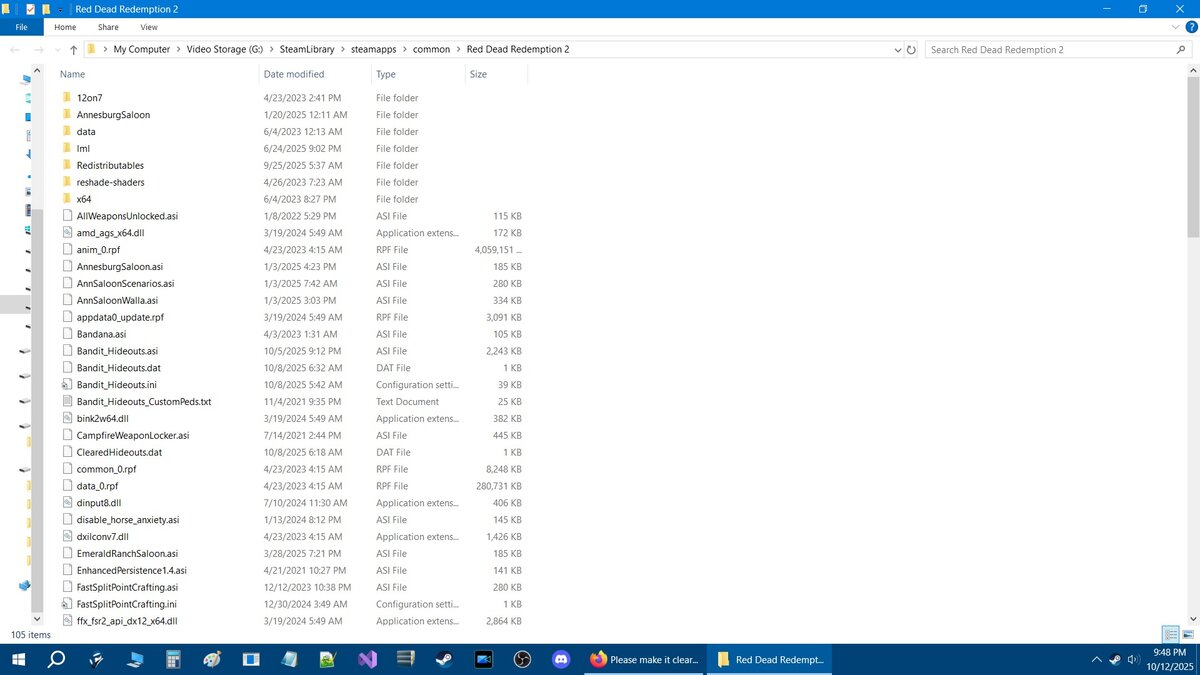
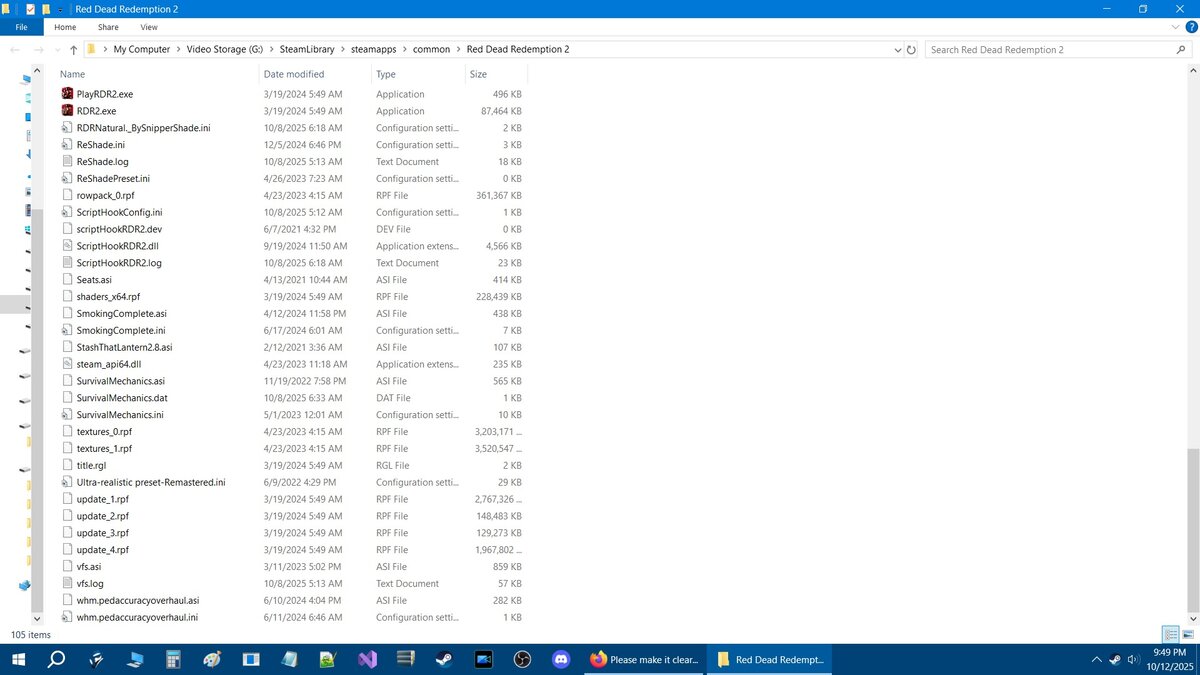
UPDATE- v1.42 - Reduced Mutant house hideout's spawn distance as it was triggering the hideout to spawn when playing Blackjack in Van Horn. - Fixed hideout cooldown as it wasn't working. - Rebuilt the reinforcement spawn points at Fire Lookout Tower as reinforcements weren't spawning. - Added new props at Fire Lookout Tower. - Increased the hideout radius of Fire Lookout Tower. - Rebuilt the reinforcement spawn points for Wapiti Cliffside hideout. - Increased the hideout radius of Wapiti Cliffside hideout. - Rebuilt the reinforcement spawn points for Valley View hideout. - Adjusted the spawn distance of Valley View hideout. - Added some new props to Valley view hideout. - Removed a redundant code from the relationships script. - Added new props to Stream view hideout. - Increased hideout radius of Tanner's Reach hideout. - Added more props to Tanner's Reach hideout. - Reduced the despawn distance of Aurora Basin. - Added new props to Aurora Basin hideout. - Increased the hideout radius to Cochinay hideout. - Added new props to Cochinay hideout. - Changed relationship for all bandits to be neutral to bounty hunters, and vice versa. - Added new props to Clawson's Rest hideout. - Added new props to Millesani Claim mine hideout. - Reduced the despawn distance of Millesani Claim mine hideout. - Reduced the despawn distance of Manzanita Camp hideout. - Increased the hideout radius of Bear Claw hideout. - Added new props to Bear Claw hideout.Sorry not doing a light version, all you need to do is open the Bandit_Hideouts.ini go to the "Disable Individual Hideouts" list which looks like this in the ini: // DISABLE INDIVIDUAL HIDEOUTS // and set all the hideouts in each region to 0 that you dont want to spawn. A whole new version with less hideouts is not realistic considering it takes 45 minutes, to 3hrs to build one hideout. To even remove a 100 hideouts from the code itself would take 3-4hrs probably more just to do to get it down to only 43 hideouts or a number in that area. It would take you way less time to just go through the list as suggested and set a bunch of them in each region to 0, then they wont spawn. You can control everything in the mod through the included ini. There is also a high resolution downloadable map you can look at and see what hideouts and ambush points with name and number there are.No, mods have their own requirements based on what they are. You have two basic mod types, LML and ASI, one goes into a folder, the other goes into the root directory. Lml mods or also known as Lenny Mod loader mods, Lml mods have a folder you put them into, most of those mods come as folders which go into the lml folder. Then you have ASI mods which are mods which all go into the root game directory, which if you have the game on steam would be here: C:\SteamLibrary\steamapps\common\Red Dead Redemption 2 keep in mind that asi mods have requirements too, some work by themselves, but most require an external files like Scripthook. Some lml mods may be good by themselves, depends what they do, but some lml mods mat require other external type files, like Rampage trainer, or offline content unlocker as examples, those are also mods. For ASI mods, most times they mainly require AB Scripthook, or the updated version which is ScripthookRDR2 V2. My suggestion is if you want to use a mod in your game, then read the details on the mod page on what that mod does, what to expect, what to look for, and then preview the files, look for any requirements it may have. I would also suggest before you download and install any mod to review any comments, or posts be it here on this website, or the Nexus website for comments discussing the mod. What you want to look for is players either asking questions, about issues with the mod, or just general stuff. imo if you see alot of comments where players are complaining or asking about something not working, or some problem, and you dont see the author's reply then imo try to look for any comments that may provide answers, fixes or a work around for whatever issue that mod may have if any. Dont just look at comments and go and ask a question, you got to put your two cents together, look at when the comments were posted, what their talking about and whether the author responded, and or still responds, and look at the time/date at when they responded. Authors that dont respond either moved on, or are to busy to reply or simply not interested, or dont have notifications on to tell them someone replied. So keep in mind that if you ask a question to an author about something in the mod and you haven't seen him respond to previous questions, then ... your wasting your time. Though others could respond and may know the answer to whatever your asking, so if you have a question do some research first, and then if nothing is found then post the question in general. Search first then ask questions. Hope that helps.Heres 2 parts of my directory, top and bottom: All the ASI files are mods, then i use reshade, so if you dont have those then dont worry thats just my directory, not how its supposed to look like for you. If you have ASI mods then yes they will be in your RDR2 directory. But i have both LML mods which in the first pic you can see lml at the top, all lml mods go in there. Then all ASI mods go into the main directory. A good mod load order? I dont use the mod manager i do everything manually, and everything gets loaded as far as im aware based on the name of the mod in alphabetical order, never had an issue with it. But ya show me a pic and let me see what your running. Yes, but how old are you talking about as im using the dinput8.dll from 2024 only reason is i just havent gotten around to updating it to the latest, and tbh its been working fine regardless. Mods that require version.dll? Idk what mods are you using that require version.dll? Maybe remove version.dll and see if those mods work with dinput8.dll but you cant run both dinput8.dll and version.dll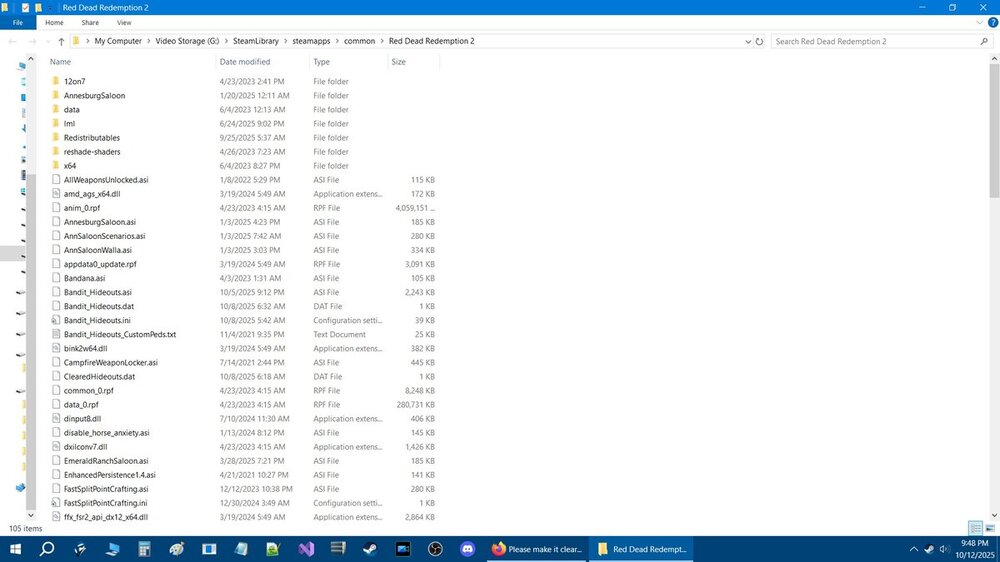
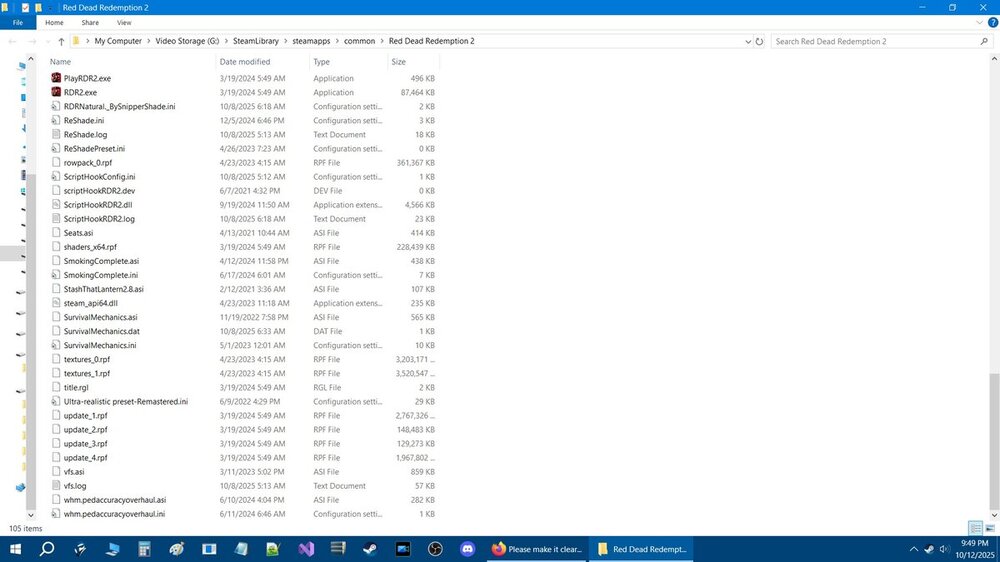 Gunter Severloh changed their profile photoThere is AB Scripthook and V2 both use a dinput8.dll but use only one not both, i suggest using V2 version and no version.dll You dont need version.dll its not the same as the dinput8.dll. Mod your trying to use based on your OP is an lml mod you dont even need Scripthook, you need Lenny's Mod loader, i would recommend installing that manually so you see a folder in your RDR2 directory that is named lml then all lml mods are put into that folder. If your using and or installing an ASI mod then its name will be modname.asi and ASI mods normally require Scripthook. Different versions of the same mods are usually running different functions/features, most times its just one or the other not both, so i suggest if you see two versions of a mod look for any information on either, either through the mod's post tab, or reviews, questions ect,.Which is it? Your trying to get Red Dead Offline to work specifically? Or you also asking about Scripthook based asi mods? Red Dead Offline is an lml mod, you need Lenny's mod loader to run that, hence the instructions on the mod page: "Installation Download with Mod Manager from here or drag and drop the extracted folder into your LML folder so that you have a structure like "Red Dead Redemption 2\lml\red_dead_offline". Please make sure to have Lenny's Simple Trainer or Outfit Changer installed to load all multiplayer components! So locate and install Lenny's mod loader, Lenny's simple trainer, or use Outfit Changer as per the instructions, what i bolded above. I would just start with LML and go from there.Update v1.41 Changelog: - Added new prop to the code to be spawned with hideouts. - Added new props to River's End hideout. - Added new props to Lone Mule stead hideout. - Added new props to Logging camp hideout. - Added new props to Fort Riggs hideout. - Added new props to Montos Rest hideout. - Added new props to Cane Break Manor hideout. - Added new props to Aberdeen Pig Farm hideout. - Added new hideout Montana Peninsula - Added new hideout Mutant House - Reduced the despawn distance of Lone Mule Stead hideout. - Reduced the spawn and despawn distances of Copperhead landing hideout.