Files posted by shaun9797
-
Discord - https://discord.gg/d6uHBsRZp8
==============================================================================
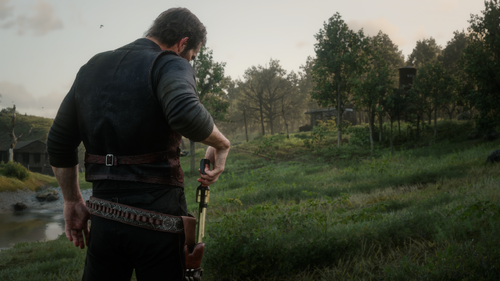
SLOW HOLSTER - put your gun away slowly, like after a standoff
==============================================================================
Every now and then in the story, after talking down a witness or defusing a
standoff, Arthur or John takes his time putting his revolver back in the
holster. This mod gives you that slow holster on a key of its own, using the
game's own animation.
Press ` (the key left of 1) with your revolver or pistol in hand and he
slowly holsters it. You can keep walking while he does. Tab still does the
normal quick holster.
With your secondary (left-hip) pistol, a rifle, a shotgun, two pistols or
anything else in hand, the key just does a normal holster. If he's carrying
a rifle or shotgun in his other hand, he keeps holding it: only his right
arm does the slow holster then.
REQUIREMENTS
------------
- Script Hook RDR2 (by Alexander Blade)
- Story mode only (Script Hook mods don't run in Red Dead Online)
INSTALL
-------
1. Copy SlowHolster.asi into your Red Dead Redemption 2 game folder (the
folder with RDR2.exe in it).
2. Optional: copy SlowHolster.ini there as well. If you don't, the mod creates
one with the default settings the first time you start the game.
UNINSTALL
---------
Delete SlowHolster.asi, SlowHolster.ini and SlowHolster.log from the game
folder.
KEY
---
` Slow holster
You can change it in SlowHolster.ini. On some non-US keyboards the ` key is
somewhere else or has another code; set HolsterKey to a key you like.
SETTINGS
--------
SlowHolster.ini explains every setting. You can change it while the game is
running: save it and the mod picks up the change within a second.
Speed How fast the animation plays. 1 = the game's own speed,
0.9 (the default) = a little slower.
HolsterAt Roughly when the gun goes into the holster, from 0 (start of
the animation) to 1 (the end). The mod looks around this point
for the moment the gun is closest to the holster.
EndAt When his arms let go and go back to normal, from 0 to 1. Lower
it if his arms hang on in a pose after holstering, raise it to
keep more of the animation.
OnHorse 1 = slow holster on horseback too, 0 = normal holster there.
GOOD TO KNOW
------------
- The gun goes into the holster at the moment it's closest to it, wherever
he's looking or however he's standing. It can still clip a little, because
his hand doesn't always reach the holster exactly.
- Aiming or shooting during the slow holster cancels it straight away, so you
can always draw again.
UPDATING
--------
Replace SlowHolster.asi. Your SlowHolster.ini is kept and gets new settings
added automatically (without their explanations). Existing values are kept.
Delete the INI if you want a fresh one with all the new defaults and
comments.
TROUBLESHOOTING
---------------
- Nothing happens on `: check HolsterKey in SlowHolster.ini, and that
SlowHolster.log in the game folder says "SlowHolster Loaded".
- For a detailed log, set DebugLog=1 in SlowHolster.ini.
---------------
shaun9797 -
Feel free to buy me a coffee!!
https://cash.app/pay/link/4z3oc3x7
(if link does not work - $shaun10197)
Discord - https://discord.gg/d6uHBsRZp8
==============================================================================
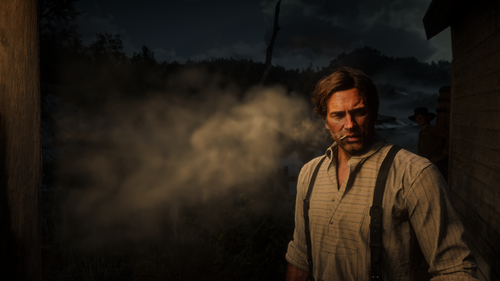
SMOKING ENHANCED - huge smoke exhales for Red Dead Redemption 2
==============================================================================
Whenever Arthur or John smokes, every drag ends in a big cloud of smoke blown
out of their mouth, and a haze is left hanging in the air afterwards.
- The smoke follows the head: if he turns his head to exhale, it comes out of
his mouth in that direction.
- Cigarettes, cigars and pipes each have their own smoke. A cigar gives a
bigger, thicker, slower cloud with more haze.
It works however you smoke:
- smoking from the item wheel or satchel
- quick smoking
- the Smoking Complete mod, including leaving a cigarette in your mouth
(then a puff of smoke comes out every few seconds)
There's nothing to press. The mod watches the cigarette, cigar or pipe in
your hand: each time it goes up to your mouth and comes away again, out
comes the smoke.
This is similar to my other mod "Shaun's Gun Smoke" in that it adds in a customizable particle effect. This time, it's for smoking (cigarette, cigar)
REQUIREMENTS
------------
- Script Hook RDR2 (by Alexander Blade)
- Story mode only (Script Hook mods don't run in Red Dead Online)
- Optional: Smoking Complete, for more ways to smoke
INSTALL
-------
Copy SmokingEnhanced.asi into your Red Dead Redemption 2 game folder (the
folder with RDR2.exe in it). The first time you start the game, the mod
creates SmokingEnhanced.ini there with the default settings and an
explanation of each one. You can also copy the included SmokingEnhanced.ini.
Updating from an older version: replace your SmokingEnhanced.ini with the new
one (or delete it and let the mod write a fresh one). The mod never
overwrites an existing INI, so an old one keeps old settings. In particular,
an INI from before this version points the haze at an effect that fills the
whole screen.
UNINSTALL
---------
Delete SmokingEnhanced.asi, SmokingEnhanced.ini and SmokingEnhanced.log from
the game folder.
KEYS
----
Z Test: blows smoke right away, without smoking. If you're holding a
cigarette, cigar or pipe it uses that one's smoke. Otherwise each press
steps through cigarette, cigar and pipe, with the name on screen, so you
can compare them. The key can be changed in the INI (TestKey).
SETTINGS (SmokingEnhanced.ini)
------------------------------
Settings are re-read every time smoke comes out, so you can change a value,
save, and see it on the next drag (or press Z). No restart needed. Every
setting is explained inside the file.
The two main settings, under [General]:
SizeMultiplier How BIG all the smoke is. 0.5 = half, 2 = double
DurationMultiplier How LONG each exhale keeps puffing out.
0.5 = half, 2 = double. For smoke that hangs in the air
longer afterwards, see [Haze] and HazeScale.
Other things you can adjust:
[General] FollowHead=0 stops the smoke following the head mid-exhale
[Cigarette] Size, length, thickness and haze for cigarettes
[Cigar] The same for cigars
[Pipe] The same for pipes
[Haze] The haze left hanging after each exhale (Enabled=0 to remove it)
To start over with the default settings, delete SmokingEnhanced.ini and the
mod writes a fresh one the next time the game starts.
TROUBLESHOOTING
---------------
No smoke at all:
- Check that Script Hook RDR2 is installed and that SmokingEnhanced.asi is
in the same folder as RDR2.exe.
- Press Z. If smoke comes out, the mod works and the problem is detecting
your smoking. If nothing comes out, the mod isn't loading. Look for
SmokingEnhanced.log in the game folder.
Smoke comes out late, or only once:
Some smoking mods use cigarette models Smoking Enhanced doesn't recognise.
It then falls back to a single exhale a couple of seconds after smoking
starts. Set DebugLog=1 in the INI, then press Z while smoking: the log
lists what's near your character's head, which identifies the model.
The haze fills the whole screen, or doesn't show:
Your SmokingEnhanced.ini is probably from an older version. Delete it and
let the mod write a fresh one. To resize the haze, change HazeScale under
[Cigarette], [Cigar] and [Pipe].
Smoke comes out of the wrong place or goes the wrong way:
Set FollowHead=0. If that fixes it, set DebugLog=1, press Z a few times and
check SmokingEnhanced.log (the "Head calibrated" and "Puff" lines).
Something else looks wrong:
Set DebugLog=1, smoke for a bit, and check SmokingEnhanced.log. Set it back
to 0 afterwards so the log stays small.
COMPATIBILITY
-------------
Smoking Enhanced only adds visual effects and doesn't change any game files.
It is made to work with Smoking Complete, and runs alongside Gun Smoke.
UPDATES
-------------
V2:
Smoke follows your head
Exhaled smoke now comes out where Arthur or John is actually facing. Turn your head to exhale and the smoke goes that way, instead of straight out from the chest.
Smoke still coming out stays at the mouth if you turn mid-exhale. Set FollowHead=0 to aim each puff once and leave it in the air.
Cigarettes, cigars and pipes each have their own smoke
Cigars: a bigger, thicker, slower cloud with more lingering smoke.
Pipes: in between.
Cigarettes: the classic quick exhale.
Each type has its own section in the INI ([Cigarette], [Cigar], [Pipe]) for size, length, thickness and haze.
Lingering haze
After each exhale, a puff of smoke forms in the air in front of the face and hangs there, fading slowly.
Set its size per type with HazeScale (0 turns it off for that type), or turn it off entirely under [Haze].
New overall controls
SizeMultiplier: makes all the smoke bigger or smaller.
DurationMultiplier: makes each exhale last longer or shorter.
Easier setup and testing
The mod now writes a fully commented INI on first launch, explaining every setting.
The test key (Z by default, now rebindable) steps through cigarette, cigar and pipe smoke when you're not holding anything, with the name on screen, so you can compare them without owning a cigar.
Debug logging is off by default, so the log file stays small. Turn it on with DebugLog=1 when troubleshooting.
Removed
The old "Cloud" option, which filled the screen, replaced by the new haze.
Nose exhales, which turned into a flat streak at large sizes. -
Discord - https://discord.gg/d6uHBsRZp8
Feel free to buy me a coffee!!
https://cash.app/pay/link/4z3oc3x7
(if link does not work - $shaun10197)
==============================================================================
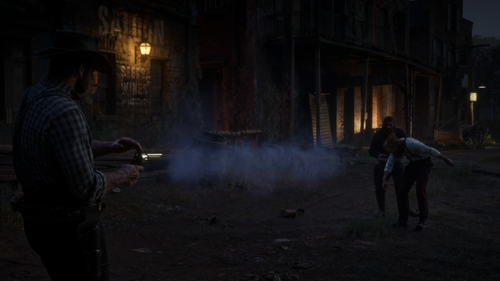
GUN SMOKE - spaghetti-western gun smoke for Red Dead Redemption 2
==============================================================================
Every shot throws out a big cloud of black-powder smoke, like an old western.
Smoke pours out of the barrel, hangs in the air where you fired, and keeps
curling off the gun afterwards. Each shot also gets a bigger muzzle flash and
a quick burst of light.
It works for you and for NPCs in a gunfight, and with revolvers, pistols,
rifles, repeaters and shotguns. Bows and thrown weapons are left alone.
Dual wielding is supported.
REQUIREMENTS
------------
- Script Hook RDR2 (by Alexander Blade)
- Story mode only (Script Hook mods don't run in Red Dead Online)
INSTALL
-------
1. Copy GunSmoke.asi into your Red Dead Redemption 2 game folder (the folder
with RDR2.exe in it).
2. Optional: copy GunSmoke.ini there as well. If you don't, the mod creates
one with the default settings the first time you start the game.
UNINSTALL
---------
Delete GunSmoke.asi, GunSmoke.ini and GunSmoke.log from the game folder.
KEYS
----
F9 Test: puffs smoke from the gun in your hand without firing, and
reloads GunSmoke.ini
F10 Turns the mod on and off
Both keys can be changed in GunSmoke.ini.
SETTINGS (GunSmoke.ini)
-----------------------
You can edit the INI while the game is running. Save it, and the changes
apply on your next shot. Every setting is explained inside the file.
The two main settings, under [General]:
SmokeMultiplier How BIG the smoke is. 0.5 = half, 2 = double,
0 = no extra smoke (the flash stays). The lingering
smoke has its own size: [Linger] Scale
DurationMultiplier How LONG it pours out. 0.5 = half, 2 = double
Other things you can adjust:
[Weapons] Extra or less smoke for handguns, rifles and shotguns
[Stream] Off by default. An extra blast of smoke thrown forward out of
the barrel (Enabled=1 to add it)
[Trail] Small puffs that keep trickling out of the barrel after a shot
[Linger] Extra smoke that hangs in the air long after the shot
[Plume] The smoke that keeps curling off the barrel after you fire
[Flash] Muzzle flash size and the burst of light (colour, brightness)
[General] AffectNPCs=0 keeps the extra smoke to your own guns only
To start over with the default settings, delete GunSmoke.ini and the mod
writes a fresh one the next time the game starts.
TROUBLESHOOTING
---------------
No extra smoke at all:
- Check that Script Hook RDR2 is installed and that GunSmoke.asi is in the
same folder as RDR2.exe.
- Look for GunSmoke.log in the game folder. If it's missing, the mod isn't
being loaded.
- Press F10 once. The mod may have been switched off.
Something looks wrong:
Set DebugLog=1 in GunSmoke.ini, fire a few shots, then check GunSmoke.log.
Set it back to 0 afterwards so the log stays small.
COMPATIBILITY
-------------
Gun Smoke only adds visual effects and doesn't change any game files. It has
been played alongside Smoking Complete, Dual Holster, Gun Tricks and Rampage.
UPDATES
-------------
V2:
New [Linger] layer:
Off-hand bug fix and plume work
Fixed the bug where a rifle carried in Arthur's left hand smoked when he fired his pistol. Only one-handed guns now count in the off hand.
Rifles and shotguns use the handgun barrel smoke for the plume, since their own versions vanished almost instantly.
Added plume logging, and the opt-in [Plume] RefreshMs.
Plume cleanup
Removed StackBonus, MaxStack and Layers. Stacking caused the upward smoke wall, and layers did nothing visible.
The plume is now one emitter per gun.
Stream off by default
The Stream is off by default, and its defaults are (ReachPuffs=8).
NPC lingering smoke
Linger smoke for NPCs is on by default.
Stream split
The Stream blast stays where you fired, controlled by the new StayInPlace. Moving or reloading no longer drags it into the air.
New [Trail] layer: short puffs that keep coming out of the barrel and follow the gun.
Linger also has StayInPlace, but its default behaviour is unchanged.