Jump to content
View in the app

A better way to browse. Learn more.

RDR2Mods.com

A full-screen app on your home screen with push notifications, badges and more.

To install this app on iOS and iPadOS
  1. Tap the Share icon in Safari
  2. Scroll the menu and tap Add to Home Screen.
  3. Tap Add in the top-right corner.
To install this app on Android
  1. Tap the 3-dot menu (⋮) in the top-right corner of the browser.
  2. Tap Add to Home screen or Install app.
  3. Confirm by tapping Install.
115 files
    • 747 Downloads
    • 3784 Views
    • 1.02 MB File Size
    Updated
    • 116 Downloads
    • 3956 Views
    • 860 B File Size
    Updated
  1. BetterUI
    • 4,444 Downloads
    • 29487 Views
    • 96.67 MB File Size
    Updated
    • 8,397 Downloads
    • 40706 Views
    • 198.52 kB File Size
    Updated
  2. small visual changes
    • 1,691 Downloads
    • 23353 Views
    • 41.47 kB File Size
    Updated
    • 961 Downloads
    • 8914 Views
    • 2.93 GB File Size
    Updated
  3. reduces taa intensity
    • 1,135 Downloads
    • 17891 Views
    • 59.26 kB File Size
    Updated
  4. euphoria ragdoll realistic live leak
    • 19,745 Downloads
    • 108156 Views
    • 81.67 kB File Size
    • 2 Comments
    Updated
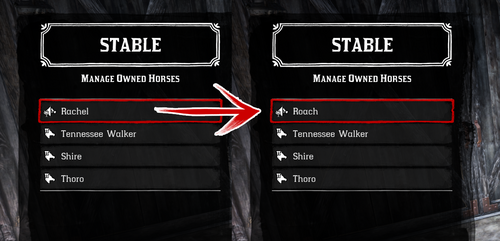
  5. Every horse available fresh out of Chapter 2!
    • 9,504 Downloads
    • 73280 Views
    • 23 MB File Size
    • 15 Comments
    Updated
  6. Removes the whistle sound effect used by the police in Saint Denis when you are wanted.
    • 231 Downloads
    • 195957 Views
    • 2.19 kB File Size
    Updated
  7. Removes the sound effect played whenever you lose honor.
    • 863 Downloads
    • 206539 Views
    • 46.93 MB File Size
    • 1 Comments
    Updated
    • 1,085 Downloads
    • 10514 Views
    • 323.26 kB File Size
    Updated
    • 3,648 Downloads
    • 30333 Views
    • 5.44 kB File Size
    • 4 Comments
    Updated
    • 10,286 Downloads
    • 55753 Views
    • 452.31 kB File Size
    • 15 Comments
    Updated
    • 2,707 Downloads
    • 35953 Views
    • 125.04 kB File Size
    • 1 Comments
    Updated
    • 4,759 Downloads
    • 50213 Views
    • 16.51 kB File Size
    • 4 Comments
    Updated

Configure browser push notifications

Chrome (Android)
  1. Tap the lock icon next to the address bar.
  2. Tap Permissions → Notifications.
  3. Adjust your preference.
Chrome (Desktop)
  1. Click the padlock icon in the address bar.
  2. Select Site settings.
  3. Find Notifications and adjust your preference.