




Jump to content
View in the app

A better way to browse. Learn more.

RDR2Mods.com

A full-screen app on your home screen with push notifications, badges and more.

To install this app on iOS and iPadOS
  1. Tap the Share icon in Safari
  2. Scroll the menu and tap Add to Home Screen.
  3. Tap Add in the top-right corner.
To install this app on Android
  1. Tap the 3-dot menu (⋮) in the top-right corner of the browser.
  2. Tap Add to Home screen or Install app.
  3. Confirm by tapping Install.

1 Screenshot

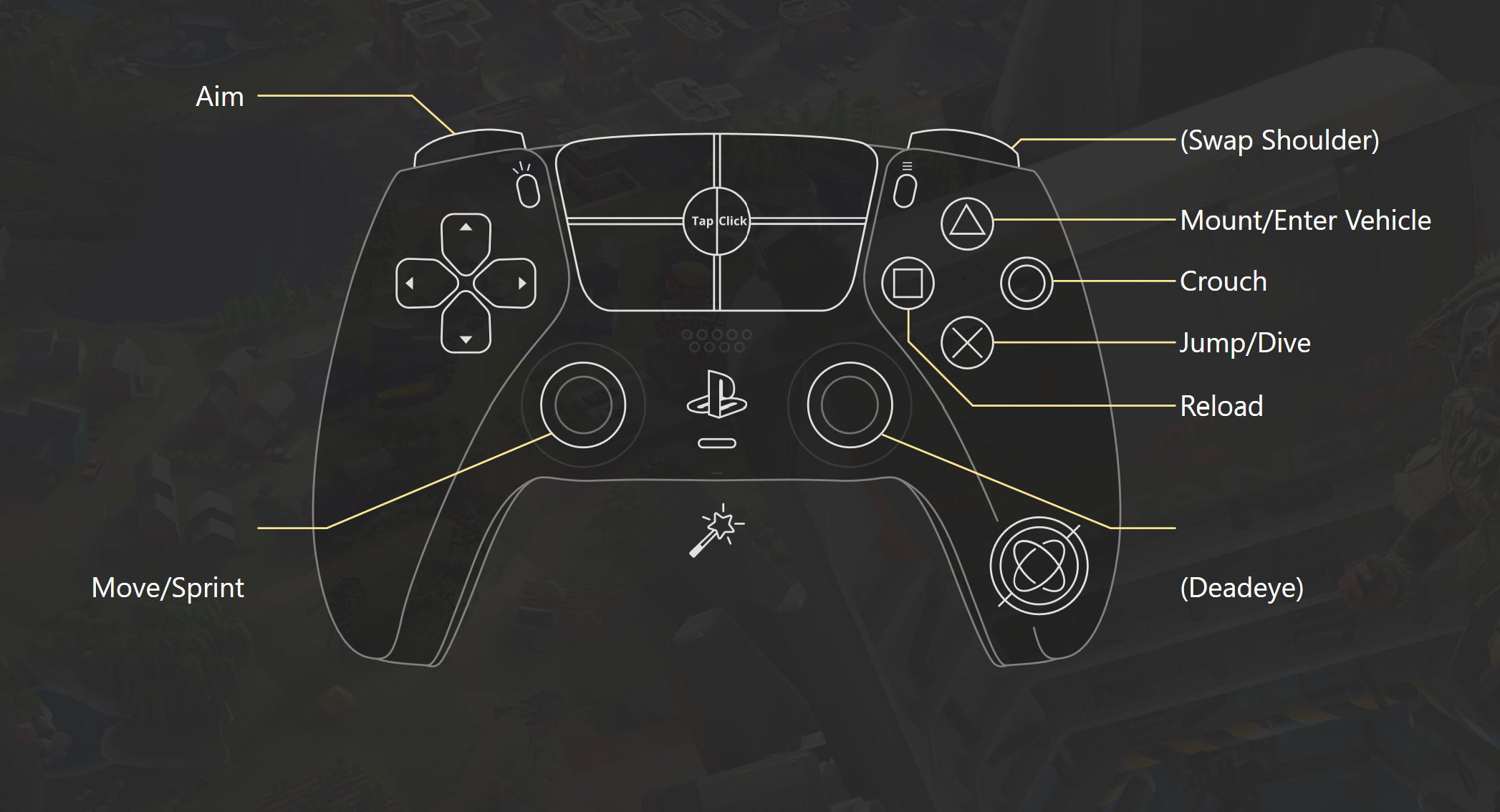
Modifies the in-game controls of the Standard FPS control scheme to more accurately portray, ya know... A standard FPS.


Control Changes:

Xbox/PS

  • Jump is now A/X instead of X/
  • Reload is now X/instead of B/O
  • Crouch is now B/O instead of A/X
  • Swap shoulder is now RB/R1 instead of Left Dpad


Installation:

Download using mod manager or...

copy the True Standard FPS folder into your LML folder.


Known Issues:

Certain QTEs (helping Reverend Swanson and using the steam donkey in Blessed are the Meek?) do not display any prompts and they cannot be completed. The only solution at the moment, is to pause the game and switch to a different control scheme.


What's New in Version 1.1

Released

Melee combat has been altered. Attack and block are now X and B respectively. (Xbox)

User Feedback

Recommended Comments

vStar925

Recognized Creator Author

(edited)

-

Edited by vStar925

romanM

Members

possible to change only shoulder swap?

Create an account or sign in to comment

Configure browser push notifications

Chrome (Android)
  1. Tap the lock icon next to the address bar.
  2. Tap Permissions → Notifications.
  3. Adjust your preference.
Chrome (Desktop)
  1. Click the padlock icon in the address bar.
  2. Select Site settings.
  3. Find Notifications and adjust your preference.
