Jump to content
View in the app

A better way to browse. Learn more.

RDR2Mods.com

A full-screen app on your home screen with push notifications, badges and more.

To install this app on iOS and iPadOS
  1. Tap the Share icon in Safari
  2. Scroll the menu and tap Add to Home Screen.
  3. Tap Add in the top-right corner.
To install this app on Android
  1. Tap the 3-dot menu (⋮) in the top-right corner of the browser.
  2. Tap Add to Home screen or Install app.
  3. Confirm by tapping Install.
66 files
    • 706 Downloads
    • 27363 Views
    • 36.36 kB File Size
    Updated
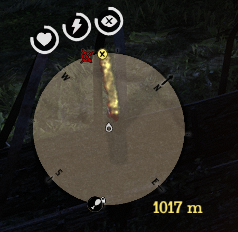
  1. This mod shows distance between waypoint and player.
    • 1,205 Downloads
    • 5992 Views
    • 62.48 kB File Size
    • 1 Comments
    Updated
    • 599 Downloads
    • 18945 Views
    • 3.65 kB File Size
    • 7 Comments
    Updated
    • 332 Downloads
    • 9856 Views
    • 956 B File Size
    • 2 Comments
    Updated
    • 2,532 Downloads
    • 27513 Views
    • 1.25 kB File Size
    • 1 Comments
    Updated
    • 1,087 Downloads
    • 26125 Views
    • 80.52 kB File Size
    • 2 Comments
    Updated
    • 1,197 Downloads
    • 32248 Views
    • 27.02 kB File Size
    Updated
  2. Undead Nightmare
    • 1,246 Downloads
    • 25318 Views
    • 32.77 kB File Size
    Updated
  3. Undead Nightmare4
    • 1,061 Downloads
    • 21150 Views
    • 43.08 kB File Size
    Updated
    • 188 Downloads
    • 12033 Views
    • 884 B File Size
    Updated
    • 782 Downloads
    • 25129 Views
    • 39.22 kB File Size
    • 1 Comments
    Updated
    • 938 Downloads
    • 23706 Views
    • 118.67 kB File Size
    • 2 Comments
    Updated
    • 355 Downloads
    • 10314 Views
    • 7.46 kB File Size
    Updated
    • 7,059 Downloads
    • 72127 Views
    • 4.96 kB File Size
    Updated
    • 525 Downloads
    • 11906 Views
    • 41.42 kB File Size
    • 1 Comments
    Updated
    • 443 Downloads
    • 21102 Views
    • 4.71 kB File Size
    • 2 Comments
    Updated

Configure browser push notifications

Chrome (Android)
  1. Tap the lock icon next to the address bar.
  2. Tap Permissions → Notifications.
  3. Adjust your preference.
Chrome (Desktop)
  1. Click the padlock icon in the address bar.
  2. Select Site settings.
  3. Find Notifications and adjust your preference.