Jump to content
View in the app

A better way to browse. Learn more.

RDR2Mods.com

A full-screen app on your home screen with push notifications, badges and more.

To install this app on iOS and iPadOS
  1. Tap the Share icon in Safari
  2. Scroll the menu and tap Add to Home Screen.
  3. Tap Add in the top-right corner.
To install this app on Android
  1. Tap the 3-dot menu (⋮) in the top-right corner of the browser.
  2. Tap Add to Home screen or Install app.
  3. Confirm by tapping Install.
66 files
    • 701 Downloads
    • 26821 Views
    • 36.36 kB File Size
    Updated
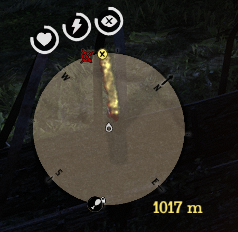
  1. This mod shows distance between waypoint and player.
    • 368 Downloads
    • 1950 Views
    • 62.48 kB File Size
    Updated
    • 588 Downloads
    • 18478 Views
    • 3.65 kB File Size
    • 7 Comments
    Updated
    • 322 Downloads
    • 9555 Views
    • 956 B File Size
    • 2 Comments
    Updated
  2. Brighter hotel room in Valentine
    • 2,439 Downloads
    • 26808 Views
    • 1.25 kB File Size
    • 1 Comments
    Updated
    • 1,070 Downloads
    • 25468 Views
    • 80.52 kB File Size
    • 2 Comments
    Updated
    • 1,173 Downloads
    • 31266 Views
    • 27.02 kB File Size
    Updated
  3. Undead Nightmare
    • 1,223 Downloads
    • 24434 Views
    • 32.77 kB File Size
    Updated
  4. Undead Nightmare4
    • 1,047 Downloads
    • 19890 Views
    • 43.08 kB File Size
    Updated
    • 183 Downloads
    • 11747 Views
    • 884 B File Size
    Updated
    • 764 Downloads
    • 24451 Views
    • 39.22 kB File Size
    • 1 Comments
    Updated
    • 921 Downloads
    • 23286 Views
    • 118.67 kB File Size
    • 2 Comments
    Updated
    • 349 Downloads
    • 10170 Views
    • 7.46 kB File Size
    Updated
    • 6,890 Downloads
    • 69734 Views
    • 4.96 kB File Size
    Updated
    • 518 Downloads
    • 11565 Views
    • 41.42 kB File Size
    • 1 Comments
    Updated
    • 432 Downloads
    • 20445 Views
    • 4.71 kB File Size
    • 2 Comments
    Updated

Configure browser push notifications

Chrome (Android)
  1. Tap the lock icon next to the address bar.
  2. Tap Permissions → Notifications.
  3. Adjust your preference.
Chrome (Desktop)
  1. Click the padlock icon in the address bar.
  2. Select Site settings.
  3. Find Notifications and adjust your preference.